Mu Online Cash Shop
In the Cash Shop you can buy exclusive items for your character, such as accessories, buffs, equipment, tickets and more.
You can use the cash shop from the official page or while inside the game.
To be able to buy in this store, you need Wcoin or Goblin Points.
Wcoins are purchased with real money from the official website and Goblin Points are earned in-game by being active on a gold server.
1 Goblin Point is earned every 10 minutes in Gold Channel Server. (The method of obtaining Goblin Points may change on unofficial servers)
Info
Most time-limited items and buffs can be extended up to 50 days.
You should read the item descriptions before making a purchase because some buffs and items cannot be used together.
If a character becomes 3rd class while 'normal' EXP buffs are in use, the buffs will still work properly until they expire.
If a 3rd class character uses 'master' EXP buff while a 'normal' EXP buff is in use, it will over-ride the normal buff.
Premium items will expire if unused after one year from its purchase date.
How to enter the cash shop

You can access the Cash Shop while in-game or from the website.
There are 3 different ways to access:
Being inside the game, from the interface, left corner.
Pressing the 'X' Key.
From the official website. (You must log in to your account)
In-game Interface
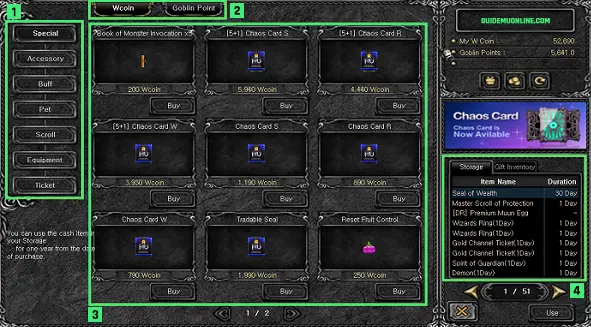
Category: This shows the list of item category.
Currency: This shows the items according to the type of currency.
Item List: If you choose a category, you can see the list of items. You can purchase items by clicking 'Buy' button.
Vault: Once you purchase an item, it will automatically go to your storage (vault). If you want to use it, click the item and then 'Use' button. It will move to your inventory.
